
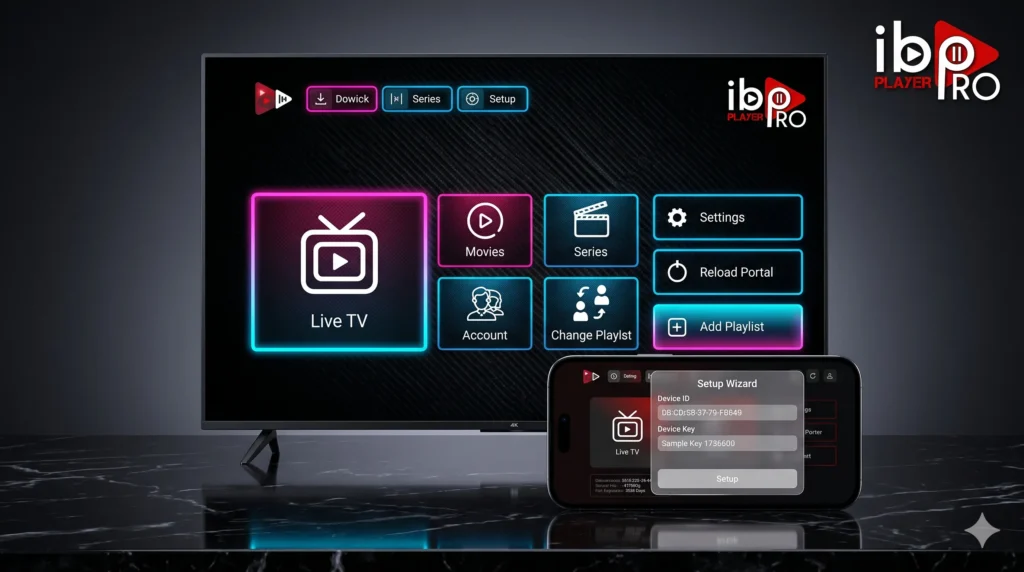
In 2026, IBO Player Pro has become one of the most polished IPTV-style media players for users who want a clean interface, fast loading, and broad device coverage across Android, Amazon Fire TV, Samsung, LG, Roku, Windows, Apple platforms, ZEASN, and Whale OS. Just as importantly, the app’s own site is explicit that it does not sell or provide channels, movies, or series. The app only becomes useful after you add an external IBO Player Pro playlist from a trusted source.
That distinction matters for setup. If you download the app and expect built-in content, you will hit a wall immediately, because activation does not unlock channels by itself; the official site warns that no channels are provided with activation and that users must add their own content lines. For readers looking for a premium, pre-optimized feed, this is where our elite networks like Limitless IPTV, Rush IPTV, and Next IPTV fit naturally. they represent the trusted external infrastructures that can supply a fast, freeze-free M3U link or Xtream Codes API login for the player.
Table of Contents
Why IBO Player Pro Stands Out
The reason many users search for IBO Player Pro tv and IBO Player Pro apk is simple: the application is designed as a premium front-end media hub rather than a barebones playlist loader. The official deployment logs show continued optimization for subtitles, clear-history tools, live audio tracks, layout changes, parental-control fixes, live channel lock, and custom group support over multiple versions.
That development history says a lot about the app’s core architecture. Rather than behaving like a basic one-screen player, the application has been refined with features that matter in daily use:
- Multiple Playlist Handling: Manage several lines easily through its unified playlist management workflow.
- Built-In Subtitle Customization: Total control over subtitle size, color, and background configurations.
- Live Audio Track Support: Easily switch between multilingual audio feeds on international channels.
- Advanced Layout Tools: Seamlessly group and categorize sports, movies, and TV series into clean folders.
- Family Control Layer: Robust parental-control related fixes and live channel lock functionality to secure your viewing.
For users running high-bitrate content, that polish matters because a premium player should do more than simply open a stream. It should organize live TV, movies, and series in a way that feels stable and modern. The platform is engineered to quickly load massive data sets across lower-end and high-end hardware alike.
Features of IBO Player Pro TV Architecture
A strong IBO Player Pro tv setup depends on three technical layers: the player itself, the external playlist, and the device it runs on. On the player side, the app is built around a device-login model, a dedicated playlist management web portal, and support for standard M3U or M3U8 playlists, while also fully accepting Xtream-style API credentials (URL, Username, Password).
Based on official documentation, the core engine revolves around:
- Dynamic playlist loading after secure device authentication.
- Flawless parsing of live channels, 4K movies, and series through uploaded provider data.
- Built-in UI quality-of-life features such as history clearing, custom group creation, and responsive layout changes.
- Ongoing fixes tailored specifically for Firestick, Android boxes, and TCL TVs.
This is also why choosing the right playlist source matters. Even the best player can only be as good as the external feed you upload. If you plan to use pre-optimized lines from Limitless IPTV, Rush IPTV, or Next IPTV, those credentials must be mapped correctly inside the portal before the app can cleanly populate your categories.
How to Download IBO Player Pro APK for Android and Firestick
If you are looking for the official IBO Player Pro apk for Android or Fire TV, the cleanest source is the direct app repository. The app publishes its official Android and Amazon Fire TV APK link at [https://iboproapp.com/ibopro.apk](https://iboproapp.com/ibopro.apk) and provides Downloader code 481220 for easy TV sideloading.
1. IBO Player Pro APK Android TV & Smart TV Installation
On Android TV, you can easily search for the app directly in the Google Play Store. However, if it doesn’t appear due to regional store restrictions, you can use the browser path to download it manually:
- Open your Android TV browser or file-transfer workflow.
- Input the direct APK link or navigate to the official repository.
- Download the official package, allow installation from unknown sources in your TV settings, and launch the app.
2. Firestick and Fire TV Installation
For Amazon Fire TV devices, you can complete the IBO Player Proapk android tv sideload sequence using the standard Downloader application:
- Go to Settings > My Fire TV > Developer Options and allow installation from unknown sources (or enable install permissions for Downloader).
- Download and open the Downloader app from the official Amazon Appstore.
- Enter the official Downloader code 481220 or paste the direct APK URL.
- Install the APK, then safely delete the leftover installer file to free up local device storage.
- Launch the app and keep the first screen visible, as it contains your unique device identifiers.
Step-by-Step: Uploading Your IBO Player Pro Playlist
This is the exact step that makes the app function. Once you open the application, you must locate the Device ID and Device Key shown on your screen and keep that active while you configure the backend portal.
Activation and Playlist Mapping Flow
- Step 1: Open the app on your TV or streaming stick and write down the Device ID and Device Key.
- Step 2: On your smartphone or laptop, open your browser and visit the official playlist management portal at
[iboplayer.com/device/playlists](https://iboplayer.com/device/playlists). - Step 3: Enter your specific Device ID and Device Key, then click Login.
- Step 4: Choose “Add Playlist”.
- Step 5: Upload your premium provider details. You can paste your direct M3U URL or select the Xtream Codes API tab to input your portal URL, username, and password provided by premium sites like Limitless IPTV, Rush IPTV, or Next IPTV.
- Step 6: Save the configuration and reboot or reload the app on your TV so the live categories populate.
⚠️ Important Activation Note: Supported devices can be activated for full permanent use after a one-time fee of 7.99 EUR per device. The platform explicitly warns users not to pay for activation if they do not already have a working playlist, as the app does not provide content and refunds are not issued for empty accounts. Always secure a high-quality subscription lines first, test it during your trial, and then activate the app shell afterward.
Troubleshooting Connection and Streaming Errors
Most setup issues come down to minor input errors, local hardware cache bottlenecks, or internet service provider throttling.
- Managing Cache & Memory Cleanup: If the interface feels sluggish on a Firestick, navigate to Settings > Applications > Manage Installed Applications > IBO Player Pro > Clear Cache. This clears out temporary streaming clutter without erasing your playlist layout.
- Fixing “No Playlist Found” Failures: If your screen stays empty after setup, re-verify your Device ID formatting in the browser portal. Check for any trailing spaces in your M3U URL string or Xtream password, save again, and restart the app from the main menu.
- Bypassing ISP Throttling via VPN: If your 4K streams run smoothly during the day but lag during major live sports events, your local internet provider may be throttling your connection bandwidth. Install a trusted VPN on your Firestick or Android TV, connect to a nearby low-latency server using the WireGuard protocol, and re-launch the app to restore stable streaming.
Final Thoughts
IBO Player Pro is best understood as a premium, highly responsive shell. It offers an elite, high-speed playback environment, but the eventual quality of your 4K home entertainment depends entirely on the playlist line you feed it.
To ensure the smoothest start, download the application using the official Downloader tools, secure a pre-optimized line from Limitless IPTV, Rush IPTV, or Next IPTV, and map it cleanly through the portal. Once configured, you will unlock a truly modern, responsive gateway to live sports, international TV, and premium VOD on any screen in your home.